
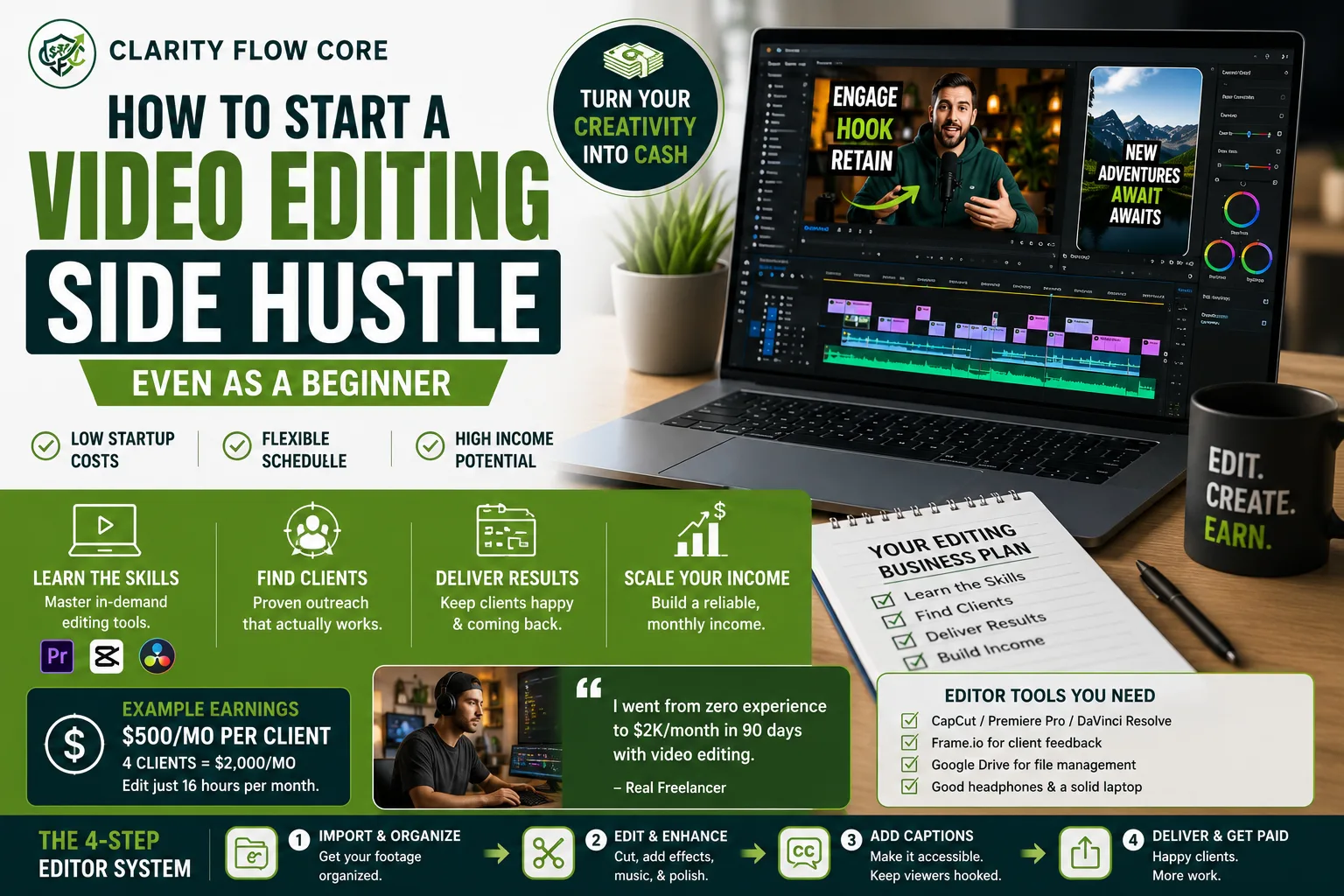
How to Start a Video Editing Side Hustle (Even as a Beginner)
The internet ecosystem has fundamentally shifted. Brands are no longer connecting with their customers through static graphics or long, text-heavy blog posts. Attention has moved exclusively to vertical, short-form video.
From local real estate agents and coffee shop owners to massive e-commerce brands and fitness coaches, every business on the planet knows they need captivating, fast-paced video content to survive social media algorithms.
The operational bottleneck? Most business owners have absolutely no idea how to edit a video. They do not know how to synchronize external audio, add dynamic captions, pace a jump-cut, or color-grade raw log footage. Furthermore, many small businesses lack the budget to hire a full-time video production team to do it for them.
They need a reliable freelancer.
You do not need a four-year film degree or a $5,000 Hollywood camera package to bridge this gap. With a competent laptop, a strong internet connection, and an understanding of human attention spans, you can build a highly lucrative video editing side hustle right from your desk.
Here is the exact operational blueprint, the raw financial math, the software stack you actually need, and the cold-outreach scripts to land your first paying client this month.
⚡ Quick Answer
- A video editing side hustle involves editing videos for businesses, creators, or brands in exchange for project fees or monthly retainers.
- Beginners can start with affordable software like CapCut or DaVinci Resolve, build sample projects, and acquire clients through direct outreach rather than relying solely on saturated freelance marketplaces.
The Operational Math: How You Actually Get Paid
The fastest way to fail at a video editing side hustle is to charge the wrong way. Beginners naturally default to charging “per hour.” This is a mathematical trap. As you get faster and more skilled at editing, an hourly rate actually punishes you by paying you less for doing the job quicker.
You must transition immediately to fixed-rate project pricing or monthly retainers.
Let’s look at the financial architecture of a standard short-form (Reels/TikTok/Shorts) retainer model:
| The Metric | The Math | The Result |
| The Deliverable | 8 Short-Form Videos per month | 2 posts per week for the client |
| The Retainer Rate | $400 to $600 per month | Billed on the 1st of every month |
| Your Time to Edit | ~30 minutes per video | 4 hours of total editing time |
| Your Effective Hourly Rate | $500 ÷ 4 hours | $125 per hour |
Many editors eventually aim to build a roster of several recurring clients. If you secure just four clients on a $500 monthly retainer, your video editing side hustle generates a highly predictable $2,000 a month. You are editing roughly 16 hours a month to make that money. That is the leverage of selling a specialized digital skill.
The Tech Stack: What You Actually Need
You do not need to finance a $6,000 Mac Pro to launch a video editing side hustle. Most modern laptops can handle basic short-form editing, especially when using proxy workflows.
However, you must separate yourself from the amateurs who edit on their cell phones. You need a desktop-class workflow.
The Software Choices
| Software | Cost | Best Use Case | The Verdict |
| CapCut (Desktop Pro) | ~$10/month | Fast, automated captions, viral effects. | The best absolute starting point for short-form content. |
| Adobe Premiere Pro | ~$22/month | Complex timelines, heavy color grading. | Necessary if you plan to edit long-form YouTube videos. |
| DaVinci Resolve | Free (or $295 for Studio) | Unrivaled color grading, incredibly stable. | The best professional software if you are on a tight budget. |
Operational Note: Do not pirate software to start your video editing side hustle. Software subscriptions are the cost of doing business, and as we outlined in our Freelancer Tax Deductions: Common Expenses You May Be Able to Claim, these monthly costs are generally tax-deductible when you file your1099 taxes.
File Management and Delivery
You cannot email 4GB video files to clients. You must build a professional delivery infrastructure.
- Google Drive / Dropbox: Upgrade to a 2TB paid tier ($10/month). You need massive cloud storage to organize raw client footage safely.
- Frame.io: This is the industry standard for client reviews. Instead of a client emailing you “can you cut the part at 0:14,” they can pause the video on Frame.io, click directly on the screen, and leave a time-stamped note. It eliminates endless back-and-forth emails.
How to Find Your First Paying Client
This is where 90% of people give up on their video editing side hustle. They build a profile on Upwork or Fiverr, sit back, and wait for clients to magically appear.
Upwork is a race to the bottom. You are competing against thousands of people willing to edit a video for $5. You cannot build a sustainable business there. You must go directly to the source via cold outreach.
The “Value-First” Outreach Strategy
Find local businesses or mid-tier creators (10k to 50k followers) on Instagram who are posting great information but have terrible video quality. They have the budget, but they lack the polish.
- Rip their content: Download one of their recent, poorly edited videos.
- Edit it: Spend 30 minutes chopping out the dead air, adding dynamic captions, applying a color grade, and fixing the audio EQ.
- Send it back for free.
The Exact DM Script:
“Hey [Name], I love the content you’ve been putting out on real estate investing. I noticed your recent Reel didn’t have captions or B-roll, which usually kills viewer retention. I took the liberty of downloading it and re-editing it for you to match current algorithmic trends. I attached the Google Drive link here. Feel free to post it! If you like this style, I have the capacity to take on one more client this month to handle all your editing. Let me know what you think.”
You are not asking for a job. You are proving undeniable, upfront value. If you send this to 20 business owners, you will land a paying client.
The Editing Framework: “Hook & Hold”
Once you land the client, you have to deliver results. If the videos you edit do not get views, your video editing side hustle will lose that client in exactly one month.
You must master the psychology of human attention. Every short-form video must follow a strict operational framework. (We touched on the monetization aspect in How to Make Money with Instagram Reels as a Beginner, but here is the technical breakdown).
- The Visual Hook (0 to 2 seconds): You must disrupt the scroll. Use a rapid “J-Cut” (where the audio of the speaker starts a fraction of a second before the visual cuts to them). Add a sharp sound effect tied to a bold, on-screen text graphic.
- The Pacing (3 to 15 seconds): Humans get bored every 3 seconds. You must force a visual reset. Punch in (zoom 10%) on the speaker’s face, cut to B-roll footage, or flash an on-screen graphic. Cut out every single breath, “um,” and pause. The dialogue should feel relentlessly fast.
- The Loop (15+ seconds): Never include an outro graphic or fade to black. End the video mid-sentence or immediately after the call-to-action so the video seamlessly loops back to the beginning.
When This Backfires: The Operational Traps
A video editing side hustle is a highly profitable endeavor, but it carries massive risk if you do not establish strict operational boundaries. The client relationship can quickly become toxic. Here is exactly when and why this business model blows up:
1. The Scope Creep Nightmare
You sign a client for $500 a month to edit 8 videos. You deliver the first batch, and the client replies, “These are great! Can you just change the font? Oh, and swap out the background music? And actually, can we cut the middle section out entirely?” Suddenly, you are doing four rounds of revisions per video. Your $125/hour rate plummets to $12/hour.
The Fix: You must use a legally binding contract that explicitly limits revisions. Your onboarding document must state: “Package includes 8 videos and ONE round of consolidated revisions per video. Additional revisions are billed at a strict rate of $75/hour.”
2. The “Exposure” Trap
As you build your video editing side hustle, influencers will approach you and ask you to edit for free in exchange for “exposure” or a “shoutout” to their audience.
Do not ever do this. Exposure does not pay your rent, and it does not pay your Quarterly Estimated Taxes. Influencers who refuse to pay their editors are universally the most demanding, difficult clients to work with. If they value your work, they will pay your invoice. (Ensure your business structure is legally sound to handle real clients by reviewing LLC vs Sole Proprietorship: Which Business Structure Makes Sense?).
3. The Raw Footage Hostage Situation
A client promises to pay you on Friday. You spend all week editing their project and send them the final, unwatermarked MP4 file on Thursday. Friday arrives, and the client ghosts you. You just worked for free.
The Fix: Never send a final, downloadable file until the invoice is paid in full. Send review links via Frame.io, or export the video with a massive, semi-transparent watermark across the center of the screen. Once the cash hits your business checking account, you send the clean file.
Frequently Asked Questions (FAQs)
Do I need professional experience to start video editing?
No. Many editors begin by creating sample projects and building a portfolio before landing paying clients.
How much can beginner video editors charge?
Rates vary widely depending on experience, niche, deliverables, and client budgets.
Is CapCut professional enough for client work?
For many short-form content projects, CapCut is entirely sufficient. More complex projects may require Premiere Pro or DaVinci Resolve.
How long does it take to learn video editing?
Basic editing skills can often be learned within weeks, while advanced storytelling, color grading, and motion graphics take longer.
Where do most freelance video editors find clients?
Many editors use direct outreach, referrals, social media networking, freelance platforms, and local business connections.
Your First Move
Starting a video editing side hustle does not require a massive leap of faith. It requires operational discipline.
Do not waste the next three weeks watching YouTube tutorials on advanced After Effects transitions. Clients do not care about fancy transitions; they care about audience retention and clear communication.
Your first move is to organize your file structures, pick a software, and find one local business owner whose content you can improve. Rip their video, edit it tonight, and send the DM tomorrow. Stop consuming content for free, and start charging to create it.
References & Trusted Sources
To secure the industry-standard software required to launch your editing business, refer directly to these official developer portals:
- Adobe Premiere Pro
- Blackmagic Design (DaVinci Resolve)
- CapCut Desktop
- Frame.io (Video Collaboration)
- U.S. Small Business Administration (SBA)
Disclaimer: The information provided in this guide is for educational purposes only and does not constitute financial, investment, or tax advice. All financial products and offers are subject to individual credit approval and specific lender terms. Please consult with a qualified financial professional to determine if the strategies or products discussed in this guide are the right fit for your personal financial situation.
About Author

Rishabh Nigam
Rishabh Nigam founded Clarity Flow Core to make personal finance easier to understand for everyday readers. He covers credit scores, debt repayment, credit utilization, loan readiness, taxes, and financial planning through practical guides, calculators, and educational resources. His content focuses on turning complex financial concepts into clear, actionable steps that readers can apply in real life.






2 Comments
Comments are closed.