

Freelance Video Editor Tax Guide: Deductions, Write-Offs & Basics
So you finally landed your first few paying clients. Congratulations. But before you take that cash and blow it on a brand-new ultra-wide monitor or a faster M-series processor to cut down your render times, we need to talk about the IRS.
Figuring out the mechanics of freelance video editor taxes is easily the least glamorous part of the job. It is also the most necessary. If you ignore it, you will lose a massive percentage of your hard-earned money to late fees and IRS penalties.
Before diving into industry-specific deductions, make sure you understand the absolute fundamentals of self-employment by reviewing 7 Tax Deductions Many Side Hustlers Overlook.
As a traditional W-2 employee, your boss magically handles all the tax withholding in the background. You never even see it. As a freelancer, you are completely on your own. It can feel incredibly overwhelming to stare down self-employment paperwork, but the process is actually highly predictable once you set up a basic operational system.
Here is your complete guide to mastering freelance video editor taxes, keeping your cash flow bulletproof, avoiding nasty penalties, and treating your editing skills like a highly profitable business.
⚡ Quick Answer
- Freelance video editors operate as independent businesses and are responsible for paying their own standard income taxes plus a 15.3% Self-Employment Tax.
- You must actively track ordinary and necessary business expenses—like Adobe subscriptions, hard drives, stock footage, and home office costs—to lower your taxable income.
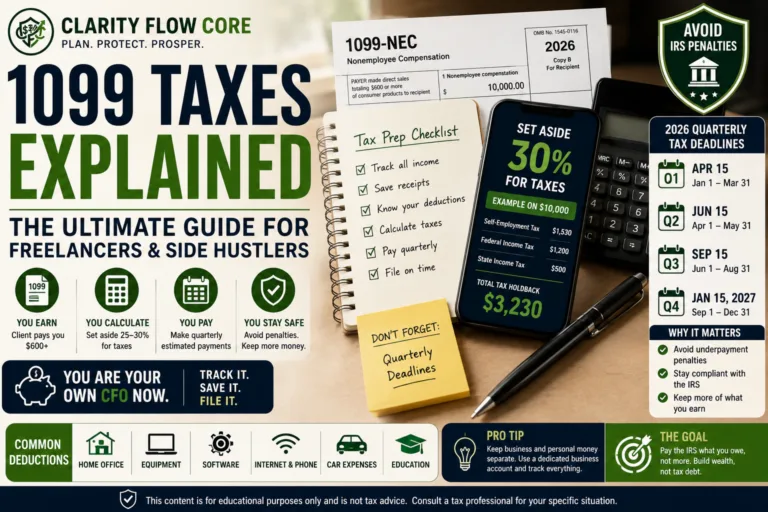
- To avoid massive penalties, separate your personal and business finances immediately, save 25% to 35% of every client invoice, and make quarterly estimated tax payments to the IRS.
The 1099 Reality: You Are Now a Business
First things first: when clients pay you directly for a video project, they do not withhold a single dime for taxes.
If a corporate client, a YouTuber, or a marketing agency pays you more than $600 in a single calendar year, they are legally required to send you a 1099-NEC form in January.
Here is the most important part: the client also sends a copy of that exact same form directly to the government. This means the IRS knows exactly how much money you made. You cannot hide it, and you cannot conveniently “forget” to report it. The foundation of managing your freelance video editor taxes is accepting that your income is already public record to the federal government.
What If You Don’t Receive a 1099?
A dangerous myth among beginner freelancers is that if a client forgets to send a 1099, or if a project paid less than $600, that income is tax-free. This is entirely false.
The $600 threshold is simply the trigger that forces the client to do paperwork. Your legal requirement to report your income begins at the first dollar you earn. If you edit a quick Instagram Reel for a local coffee shop and they pay you $300 via Venmo, you must report that $300 on your tax return, regardless of whether a 1099 shows up in your mailbox. Always maintain your own meticulous income records.
The Math: Why Self-Employment Tax Hurts
To truly understand freelance video editor taxes, you have to understand why they feel so much higher than the taxes at your old day job.
When you work a normal W-2 job, you pay 7.65% of your income toward FICA taxes (Medicare and Social Security). Your employer pays the other 7.65% on your behalf.
When you are a freelancer, you are both the employee and the employer. The IRS requires you to pay both halves. This is called the Self-Employment Tax, and it sits at a flat 15.3%. That 15.3% is charged before you even factor in your standard federal and state income tax brackets.
(If you’re unfamiliar with how self-employment taxes are mathematically calculated on your return, review 1099 Taxes Explained for Freelancers and Side Hustlers for a complete breakdown).
Let’s look at the operational math of a standard project to see how freelance video editor taxes actually hit your bank account. Assume you just charged a corporate client $4,000 for a promotional video.
| Invoice Breakdown | Dollar Amount | Where the Money Goes |
| Gross Payment Received | $4,000 | Deposited into your business account |
| Self-Employment Tax (15.3%) | -$612 | Owed to the IRS |
| Estimated Income Tax (~12%) | -$480 | Owed to the IRS and State |
| Total Tax Holdback (27.3%) | -$1,092 | Held in your separate tax savings account |
| Your Actual Take-Home Pay | $2,908 | Yours to spend or invest |
If you spend the full $4,000, you are going to be in a massive financial crisis when tax season arrives. You only actually made $2,908.
How Much Should Video Editors Save for Taxes?
Because tax brackets scale based on how much money you make, the amount you need to save changes as your freelance business grows. If you are operating as a sole proprietor or a single-member LLC, you can use these baseline targets to ensure you always have enough cash to cover your tax bill:
- Net Income Under $30,000: Save 25% of every invoice.
- Net Income $30,000 to $75,000: Save 30% of every invoice.
- Net Income Over $75,000: Save 35% of every invoice.
(Note: If you live in a state with zero income tax, like Texas or Florida, you can usually scale these percentages down by about 4% to 5%. If you live in a high-tax state like California or New York, aim for the absolute maximum).
Step 1: Separate Your Money Immediately
The absolute biggest mistake beginners make with their freelance video editor taxes is commingling their funds. If you deposit a $4,000 client check into the exact same personal checking account you use to buy groceries and pay for Netflix, your accounting will be a disaster.
Go to a local bank or a digital platform and open a dedicated Business Checking Account.
Every single dollar you make from editing needs to drop into this account first. When you want to pay yourself, you simply transfer a chunk of it over to your personal checking. This creates a crystal-clear paper trail of exactly what your business is earning. When it comes time to file your freelance video editor taxes, your accountant will just look at that one specific bank statement.
Many freelancers also choose to form a formal business entity as their income grows to further separate their liability. See Sole Proprietor vs LLC: Which Is Best for a Side Hustle? to determine your best setup.
Step 2: Prepare for Quarterly Tax Payments
The US government does not want to wait until next April to get paid.
If you expect to owe more than $1,000 in freelance video editor taxes for the year, the IRS legally requires you to make “Quarterly Estimated Tax Payments.” You have to send them a check four times a year (usually in April, June, September, and January).
For exact payment deadlines, safe harbor rules, and IRS penalty avoidance strategies, see Quarterly Estimated Taxes Explained for Freelancers and Side Hustlers.
This is where a strict system saves you. A bulletproof rule of thumb? Transfer your target tax percentage (e.g., 30%) into a separate High-Yield Savings Account the exact day a client invoice clears. Treat that money like it does not belong to you, because it doesn’t.
If you are dealing with clients who pay irregularly or operate on net-30 terms, you need to read How to Budget as a Freelancer When Income Changes Every Month. You cannot let a massive $10,000 month trick you into spending your tax reserve. Keep the tax money isolated. When those quarterly due dates roll around, you will have the exact amount of cash sitting there waiting to be sent to the IRS.
Step 3: Track Your Industry Write-Offs
This is where you actually save money. Because you are essentially operating as a small business, the IRS allows you to deduct the “ordinary and necessary” costs of doing your job.
Every time you deduct a business expense, you lower your taxable income. If you made $50,000 this year, but you had $10,000 in legitimate business write-offs, the IRS only taxes you as if you made $40,000. This drastically reduces your overall freelance video editor taxes.
To keep it simple, pay for all your business expenses using the dedicated Business Debit or Credit Card attached to the account you opened in Step 1.
Common Video Editor Write-Off Examples
Here is a quick cheat sheet of what you can and cannot deduct as an editor:
| Expense | Deductible? | Why? |
| Adobe Creative Cloud | Yes | Necessary software to complete client work. |
| Frame.io Subscription | Yes | Required for client feedback and review cycles. |
| External SSDs & NAS Drives | Yes | You cannot store 4K raw footage without them. |
| Epidemic Sound / Artlist | Yes | Licensing music for client projects is a direct cost. |
| Editing Masterclasses | Yes | Improves your existing business skills. |
| Gaming Console (PS5) | No | Personal entertainment, unless used strictly for a gaming channel. |
| Personal Netflix Account | No | Watching movies is not an ordinary editing expense. |
The Home Office Deduction
Because editors rarely work out of a commercial office space, the Home Office Deduction is one of the most powerful tools for reducing freelance video editor taxes.
The home office deduction is often one of the largest available freelancer write-offs, especially for editors working from dedicated studios or editing suites inside their homes.
If you use a specific room in your apartment exclusively for editing, you can write off a percentage of your rent, utilities, and renter’s insurance. If your editing office takes up 10% of your apartment’s total square footage, you can legally deduct 10% of your rent and utility bills from your taxes at the end of the year. (Just remember: the space must be used regularly and exclusively for business. Your kitchen island does not count).
When Freelance Video Editor Taxes Backfire
The tax code is incredibly unforgiving. If you treat your freelance business like a casual hobby, the IRS will eventually catch up with you. Here is exactly when and why freelance video editor taxes backfire and ruin freelancers:
1. The April Surprise
This is the most common disaster. A freelancer lands several massive clients, makes $60,000 in their first year, and spends all of it to upgrade their lifestyle. They ignore quarterly payments. April arrives, and their accountant informs them they owe $16,000 in federal and state taxes, plus underpayment penalties.
Because they have no cash reserve, they have to take out a high-interest personal loan just to pay the IRS. Building a dedicated emergency fund can prevent these situations from turning into high-interest debt. See Emergency Fund Basics: How Much Cash Should You Keep?.
2. The Section 179 Trap
The IRS has a rule (Section 179) that allows you to deduct the entire purchase price of heavy equipment in a single year, subject to limits, rather than depreciating it slowly over five years. Some editors hear this and immediately finance a $6,000 Mac Studio and a $4,000 OLED grading monitor, thinking the “tax write-off” makes it free.
A write-off does not make an item free. It just means you don’t pay taxes on the money used to buy it. If you spend $10,000 on gear to save $2,500 in taxes, you are still out $7,500 in cash. Never buy gear just for the tax deduction. Buy it only if your workflow actively requires it to handle heavier codecs or faster turnarounds.
3. Mixing Personal and Business Expenses
If you buy your groceries, your dog food, and your Adobe subscription all on the same personal credit card, you are begging for an audit. If the IRS audits your freelance video editor taxes and sees commingled funds, they can immediately disallow all of your deductions. You will be forced to pay back-taxes and severe financial penalties. Keep a firewall between your personal life and your editing business.
Frequently Asked Questions (FAQs)
Do freelance video editors need an LLC?
You are not legally required to have an LLC to freelance. You can operate as a Sole Proprietor using your Social Security Number. However, an LLC provides liability protection and can offer tax advantages as your income scales.
Can I deduct my camera equipment?
Yes. If you shoot your own footage for client projects, cameras, lenses, lighting, and audio gear are considered ordinary and necessary business expenses and are tax-deductible.
Can I deduct my editing computer?
Yes, but only the percentage used for business. If you use a custom PC 80% for editing and 20% for personal gaming, you can only deduct 80% of the cost.
Can I deduct stock footage and music subscriptions?
Absolutely. Subscriptions to platforms like Envato Elements, Motion Array, Artlist, or Shutterstock are direct operational costs of your editing business.
What if I don’t receive a 1099 from a client?
You are still legally required to report the income to the IRS. Maintain your own invoices and bank records to ensure you accurately report your total gross revenue, regardless of whether the client sends the official paperwork.
Automating Your Tax Strategy
You should never have to manually calculate your tax burden every Friday night. You need to build a system that handles your freelance video editor taxes automatically.
If you maintain a solid cash buffer, you can simply run your business cash flow like a machine:
- Client pays the invoice.
- Invoice lands in your Business Checking Account.
- 30% automatically transfers to a separate Tax Savings Account.
- The remainder transfers to your Personal Checking to pay your bills.
Taxes do not have to be a terrifying black cloud hanging over your career. If you keep your money separated, aggressively save a percentage of every paycheck, and meticulously track your software subscriptions, your freelance video editor taxes will just become another predictable background task.
Once your editing income becomes consistent, review Sole Proprietor vs LLC: Which Is Best for a Side Hustle? to determine whether a formal business structure makes sense. If you have your financial systems locked in and are ready to scale up your income to find higher-paying clients, revisit our core blueprint on How to Start a Video Editing Side Hustle (Even as a Beginner) to take your business to the next level.
References & Trusted Sources
To ensure your editing business remains entirely compliant with federal tax laws, consult these official IRS guidelines for self-employed individuals:
- IRS Self-Employed Individuals Tax Center
- IRS Form 1099-NEC Information
- IRS Publication 535 (Business Expenses)
- IRS Schedule C (Form 1040) Instructions
- IRS Guide to Estimated Taxes
Disclaimer: The information provided in this guide is for educational purposes only and does not constitute financial, investment, or tax advice. All financial products and offers are subject to individual credit approval and specific lender terms. Please consult with a qualified financial professional to determine if the strategies or products discussed in this guide are the right fit for your personal financial situation.
About Author

Rishabh Nigam
Rishabh Nigam founded Clarity Flow Core to make personal finance easier to understand for everyday readers. He covers credit scores, debt repayment, credit utilization, loan readiness, taxes, and financial planning through practical guides, calculators, and educational resources. His content focuses on turning complex financial concepts into clear, actionable steps that readers can apply in real life.





6 Comments
Comments are closed.